7  One-factor Design and Analysis

7.1 Completely Randomized Design

7.1.1 Design on R

Code
treatments <- LETTERS[1:4]
rep.treatments <- rep(treatments, each = 5)
rep.treatments
 [1] "A" "A" "A" "A" "A" "B" "B" "B" "B" "B" "C" "C" "C" "C" "C" "D" "D" "D" "D"
[20] "D"
Code
sample (rep.treatments)
 [1] "D" "C" "B" "A" "D" "D" "C" "A" "A" "D" "B" "C" "B" "B" "C" "A" "A" "C" "D"
[20] "B"
Code
data.frame(run.ID = 1:20, treatment = sample (rep.treatments))

7.1.2 Plasma Etching Experiment

This section analyzes data from a Completely Randomized Design (CRD). In a CRD, experimental units (in this case, the silicon wafers being etched) are assigned to treatments (the RF Power levels) completely at random. The primary goal is to determine if changing the RF Power level has a statistically significant effect on the mean etch rate.

7.1.2.1 Data and Visualization

We begin by loading the data into a single, tidy data.frame. The response variable, rate, contains all the etch rate observations. The predictor variable, power, is a factor, which is R’s way of representing a categorical variable. This tells R to treat the different power levels as distinct groups.

Code
## Define the data vectors
rate <- c(575, 542, 530, 539, 570, 565, 593, 590, 579, 610,
          600, 651, 610, 637, 629, 725, 700, 715, 685, 710)
power_levels <- c(160, 180, 200, 220)

## Create the data frame
etching_df <- data.frame(
  rate = rate,
  power = factor(rep(power_levels, each = 5))
)

## Display the first few rows
etching_df

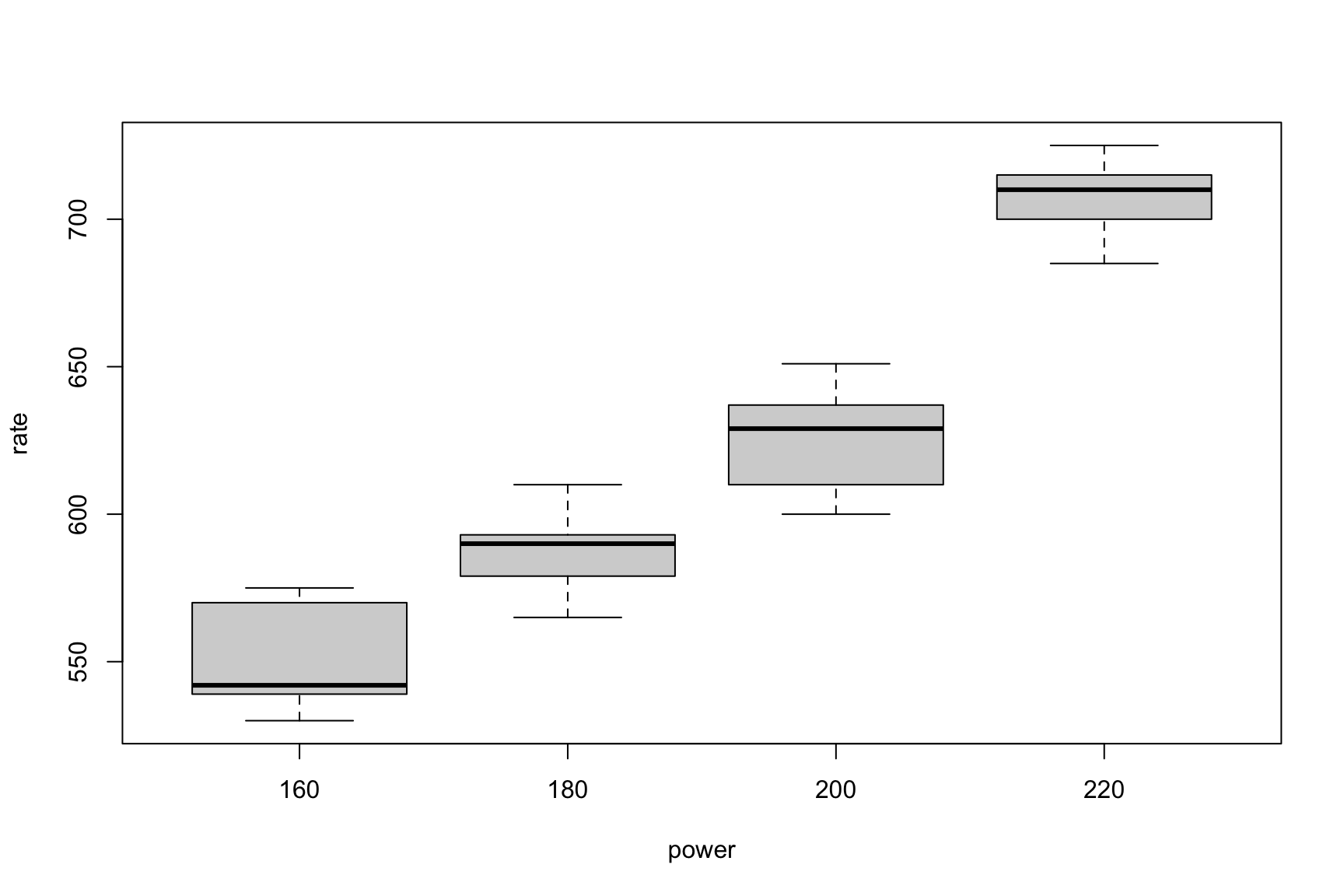
Grouped Boxplots

Code
boxplot(rate~power, data=etching_df)

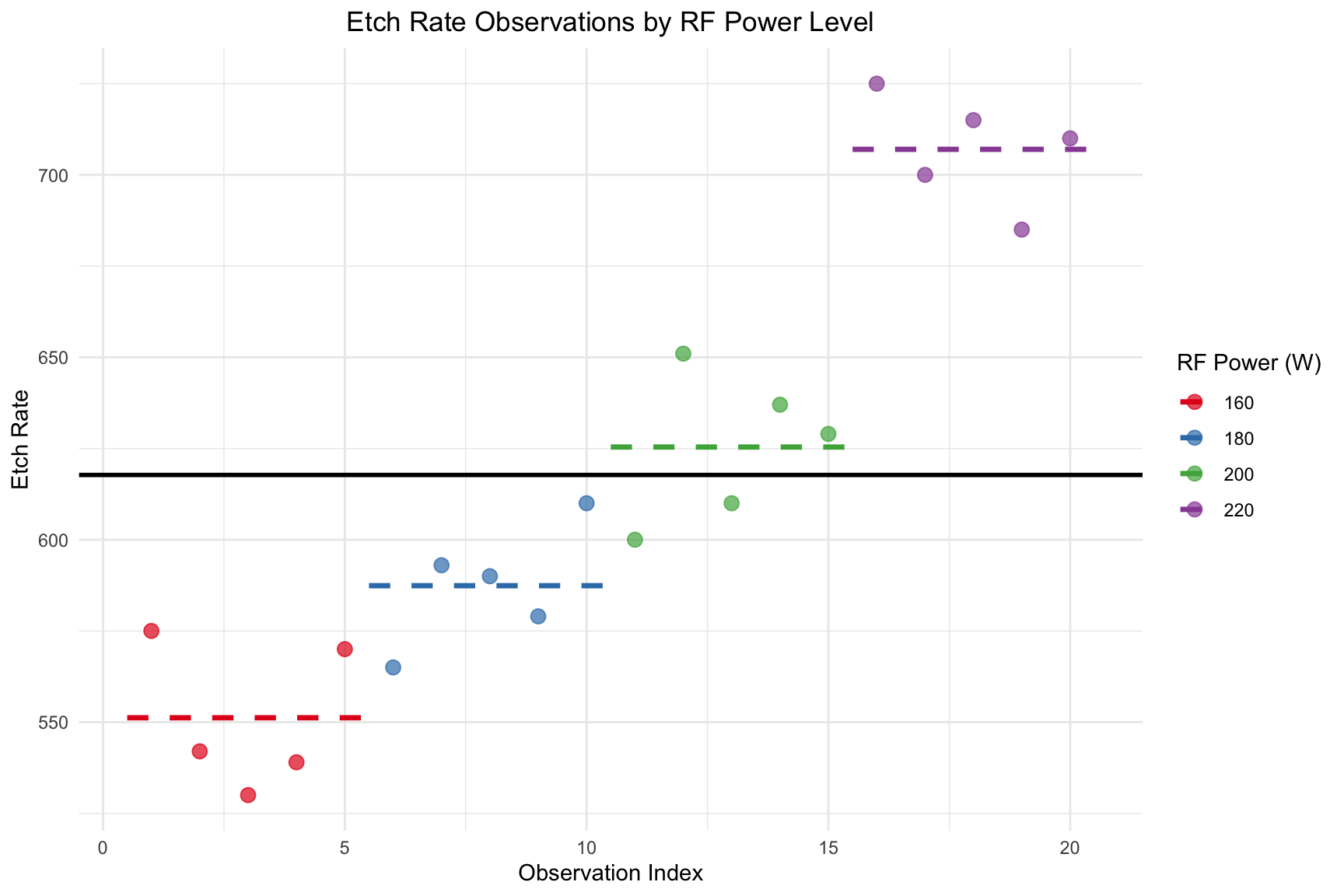
Using ggplot to visualize grouped data

Code
library(ggplot2)
library(dplyr) # Using dplyr for easier data manipulation

## Calculate group means and their start/end indices
mean_rates <- etching_df %>%
  mutate(obs_index = row_number()) %>%
  group_by(power) %>%
  summarise(
    mean_rate = mean(rate),
    x_start = min(obs_index) - 0.5,
    x_end = max(obs_index) + 0.5
  )

ggplot(etching_df, aes(x = 1:nrow(etching_df), y = rate, color = power)) +
  geom_hline(
    yintercept = mean(etching_df$rate), 
    linetype = "solid", 
    color = "black", 
    size = 1
  ) +
  # ----------------------------------------
  geom_point(size = 3, alpha = 0.7) + # Plot individual data points
  geom_segment(
    data = mean_rates, 
    aes(x = x_start, xend = x_end, y = mean_rate, yend = mean_rate),
    linetype = "dashed", 
    size = 1.2
  ) + # Add line segments for group means
  labs(
    title = "Etch Rate Observations by RF Power Level",
    x = "Observation Index",
    y = "Etch Rate",
    color = "RF Power (W)"
  ) +
  scale_color_brewer(palette = "Set1") +
  theme_minimal() +
  theme(plot.title = element_text(hjust = 0.5))

Index Plot of Etch Rate with Group-Specific Mean Lines

7.1.2.2 Cell Mean Models (zero-intercept)

Code
fit_nointercpt <- lm(rate ~ 0+power, data = etching_df)
model.matrix(fit_nointercpt)
   power160 power180 power200 power220
1         1        0        0        0
2         1        0        0        0
3         1        0        0        0
4         1        0        0        0
5         1        0        0        0
6         0        1        0        0
7         0        1        0        0
8         0        1        0        0
9         0        1        0        0
10        0        1        0        0
11        0        0        1        0
12        0        0        1        0
13        0        0        1        0
14        0        0        1        0
15        0        0        1        0
16        0        0        0        1
17        0        0        0        1
18        0        0        0        1
19        0        0        0        1
20        0        0        0        1
attr(,"assign")
[1] 1 1 1 1
attr(,"contrasts")
attr(,"contrasts")$power
[1] "contr.treatment"
Code
summary(fit_nointercpt)

Call:
lm(formula = rate ~ 0 + power, data = etching_df)

Residuals:
   Min     1Q Median     3Q    Max 
 -25.4  -13.0    2.8   13.2   25.6 

Coefficients:
         Estimate Std. Error t value Pr(>|t|)    
power160  551.200      8.169   67.47   <2e-16 ***
power180  587.400      8.169   71.90   <2e-16 ***
power200  625.400      8.169   76.55   <2e-16 ***
power220  707.000      8.169   86.54   <2e-16 ***
---
Signif. codes:  0 '***' 0.001 '**' 0.01 '*' 0.05 '.' 0.1 ' ' 1

Residual standard error: 18.27 on 16 degrees of freedom
Multiple R-squared:  0.9993,    Adjusted R-squared:  0.9991 
F-statistic:  5768 on 4 and 16 DF,  p-value: < 2.2e-16
Code
confint(fit_nointercpt)
            2.5 %   97.5 %
power160 533.8815 568.5185
power180 570.0815 604.7185
power200 608.0815 642.7185
power220 689.6815 724.3185
Code
anova(fit_nointercpt)

This ANOVA result is typically unwanted. If we want to see the causal effect of power, we need to compare to intercept-only model:

Code
fit_intercept <- lm(rate ~ 1, data = etching_df)
anova(fit_intercept, fit_nointercpt)

7.1.2.3 Centralized Effect Model (Sum-to-Zero Constraint)

We fit a linear model using the lm() function to perform an Analysis of Variance (ANOVA). The model is specified as rate ~ power, and we now include the data = etching_df argument.

To get interpretable estimates for the treatment effects (\(\tau_i\)), we use a sum-to-zero constraint (contr.sum), which forces the sum of the treatment effects to be zero (\(\sum \tau_i = 0\)).

Code
fit <- lm(rate ~ power, data = etching_df, contrasts = list(power = contr.sum))

Model Matrix:

Code
model.matrix(fit)
   (Intercept) power1 power2 power3
1            1      1      0      0
2            1      1      0      0
3            1      1      0      0
4            1      1      0      0
5            1      1      0      0
6            1      0      1      0
7            1      0      1      0
8            1      0      1      0
9            1      0      1      0
10           1      0      1      0
11           1      0      0      1
12           1      0      0      1
13           1      0      0      1
14           1      0      0      1
15           1      0      0      1
16           1     -1     -1     -1
17           1     -1     -1     -1
18           1     -1     -1     -1
19           1     -1     -1     -1
20           1     -1     -1     -1
attr(,"assign")
[1] 0 1 1 1
attr(,"contrasts")
attr(,"contrasts")$power
    [,1] [,2] [,3]
160    1    0    0
180    0    1    0
200    0    0    1
220   -1   -1   -1

Summary of lm fitting results:

Code
summary.fit <- summary(fit)
summary.fit

Call:
lm(formula = rate ~ power, data = etching_df, contrasts = list(power = contr.sum))

Residuals:
   Min     1Q Median     3Q    Max 
 -25.4  -13.0    2.8   13.2   25.6 

Coefficients:
            Estimate Std. Error t value Pr(>|t|)    
(Intercept)  617.750      4.085 151.234  < 2e-16 ***
power1       -66.550      7.075  -9.406 6.39e-08 ***
power2       -30.350      7.075  -4.290 0.000563 ***
power3         7.650      7.075   1.081 0.295602    
---
Signif. codes:  0 '***' 0.001 '**' 0.01 '*' 0.05 '.' 0.1 ' ' 1

Residual standard error: 18.27 on 16 degrees of freedom
Multiple R-squared:  0.9261,    Adjusted R-squared:  0.9122 
F-statistic:  66.8 on 3 and 16 DF,  p-value: 2.883e-09

Confidence Interval for Centralized Effects:

The output of the model provides estimates for the overall mean (\(\hat{\mu}\)) and the treatment effects for the first k-1 levels (\(\hat{\tau}_1, \hat{\tau}_2, \hat{\tau}_3\)).

  • \(\hat{\mu}\) (the Intercept) is the estimate of the grand mean etch rate across all power levels.
  • \(\hat{\tau}_i\) is the estimated effect of the i-th power level, representing how much that level’s mean deviates from the grand mean.

Using the sum-to-zero constraint, we can manually calculate the effect for the final level, \(\hat{\tau}_4\).

Code
# Define a named vector of all linear combinations
#
# NOTE: Replace 'power1', 'power2', 'power3' with the
# actual names from your coef(fit) output.
#
# The names on the left (e.g., "Level_1_Effect") are
# for you; they will label the output rows.
library(biostat3)
k_all_levels <- c(
  "Effect for Level 1" = "power1",
  "Effect for Level 2" = "power2",
  "Effect for Level 3" = "power3",
  "Effect for Level 4" = "-power1 - power2 - power3"
)
# Run lincom on the whole vector
lincom(fit, k_all_levels)
                   Estimate 2.5 %     97.5 %    Df Sum of Sq
Effect for Level 1 -66.55   -80.41666 -52.68334 1  29526.02 
Effect for Level 2 -30.35   -44.21666 -16.48334 1  6140.817 
Effect for Level 3 7.65     -6.216659 21.51666  1  390.15   
Effect for Level 4 89.25    75.38334  103.1167  1  53103.75 
Code
##### Estimate of Treatment Means

We can verify the above results by looking at the point estimate of centralized effect by direct calculation. The construction of CI is more complicated, hence, omitted.

Code
## Extract coefficients
est <- coef(fit)
tau4.hat <- -sum(est[-1])
taui.hat <- c(est[-1], tau4.hat)
print(taui.hat)
power1 power2 power3        
-66.55 -30.35   7.65  89.25 
7.1.2.3.1 ANOVA

The ANOVA table partitions the total variation into variation between treatment groups (power) and variation within treatment groups (random error). The p-value (Pr(>F)) indicates if the treatment has a significant effect.

Code
anova(fit)

7.1.2.4 Baseline Model (Default for R)

Fitting the model without specifying contrasts uses R’s default (“treatment” contrast), which sets \(\tau_1 = 0\). The fundamental results (ANOVA, treatment means) remain unchanged.

Code
fit1 <- lm(rate ~ power, data = etching_df)
model.matrix(fit1)
   (Intercept) power180 power200 power220
1            1        0        0        0
2            1        0        0        0
3            1        0        0        0
4            1        0        0        0
5            1        0        0        0
6            1        1        0        0
7            1        1        0        0
8            1        1        0        0
9            1        1        0        0
10           1        1        0        0
11           1        0        1        0
12           1        0        1        0
13           1        0        1        0
14           1        0        1        0
15           1        0        1        0
16           1        0        0        1
17           1        0        0        1
18           1        0        0        1
19           1        0        0        1
20           1        0        0        1
attr(,"assign")
[1] 0 1 1 1
attr(,"contrasts")
attr(,"contrasts")$power
[1] "contr.treatment"
Code
summary(fit1)

Call:
lm(formula = rate ~ power, data = etching_df)

Residuals:
   Min     1Q Median     3Q    Max 
 -25.4  -13.0    2.8   13.2   25.6 

Coefficients:
            Estimate Std. Error t value Pr(>|t|)    
(Intercept)  551.200      8.169  67.471  < 2e-16 ***
power180      36.200     11.553   3.133  0.00642 ** 
power200      74.200     11.553   6.422 8.44e-06 ***
power220     155.800     11.553  13.485 3.73e-10 ***
---
Signif. codes:  0 '***' 0.001 '**' 0.01 '*' 0.05 '.' 0.1 ' ' 1

Residual standard error: 18.27 on 16 degrees of freedom
Multiple R-squared:  0.9261,    Adjusted R-squared:  0.9122 
F-statistic:  66.8 on 3 and 16 DF,  p-value: 2.883e-09

Using 200 as the baseline

If we want to treat power200 as the baseline, we do this:

Code
# modifying the levels of power
etching_df$power <- factor(etching_df$power, levels=c("200","160", "180", "220"))
Code
fit1_200 <- lm(rate ~ power, data = etching_df)
model.matrix(fit1_200)
   (Intercept) power160 power180 power220
1            1        1        0        0
2            1        1        0        0
3            1        1        0        0
4            1        1        0        0
5            1        1        0        0
6            1        0        1        0
7            1        0        1        0
8            1        0        1        0
9            1        0        1        0
10           1        0        1        0
11           1        0        0        0
12           1        0        0        0
13           1        0        0        0
14           1        0        0        0
15           1        0        0        0
16           1        0        0        1
17           1        0        0        1
18           1        0        0        1
19           1        0        0        1
20           1        0        0        1
attr(,"assign")
[1] 0 1 1 1
attr(,"contrasts")
attr(,"contrasts")$power
[1] "contr.treatment"
Code
summary(fit1_200)

Call:
lm(formula = rate ~ power, data = etching_df)

Residuals:
   Min     1Q Median     3Q    Max 
 -25.4  -13.0    2.8   13.2   25.6 

Coefficients:
            Estimate Std. Error t value Pr(>|t|)    
(Intercept)  625.400      8.169  76.553  < 2e-16 ***
power160     -74.200     11.553  -6.422 8.44e-06 ***
power180     -38.000     11.553  -3.289  0.00462 ** 
power220      81.600     11.553   7.063 2.68e-06 ***
---
Signif. codes:  0 '***' 0.001 '**' 0.01 '*' 0.05 '.' 0.1 ' ' 1

Residual standard error: 18.27 on 16 degrees of freedom
Multiple R-squared:  0.9261,    Adjusted R-squared:  0.9122 
F-statistic:  66.8 on 3 and 16 DF,  p-value: 2.883e-09

ANOVA

Code
anova(fit1_200)

Using 220 as the baseline

If we want to treat power220 as the baseline, we do this:

Code
etching_df$power <- factor(etching_df$power, levels=c("220","160", "180","200" ))
Code
fit1_220 <- lm(rate ~ power, data = etching_df)
model.matrix(fit1_220)
   (Intercept) power160 power180 power200
1            1        1        0        0
2            1        1        0        0
3            1        1        0        0
4            1        1        0        0
5            1        1        0        0
6            1        0        1        0
7            1        0        1        0
8            1        0        1        0
9            1        0        1        0
10           1        0        1        0
11           1        0        0        1
12           1        0        0        1
13           1        0        0        1
14           1        0        0        1
15           1        0        0        1
16           1        0        0        0
17           1        0        0        0
18           1        0        0        0
19           1        0        0        0
20           1        0        0        0
attr(,"assign")
[1] 0 1 1 1
attr(,"contrasts")
attr(,"contrasts")$power
[1] "contr.treatment"
Code
summary(fit1_220)

Call:
lm(formula = rate ~ power, data = etching_df)

Residuals:
   Min     1Q Median     3Q    Max 
 -25.4  -13.0    2.8   13.2   25.6 

Coefficients:
            Estimate Std. Error t value Pr(>|t|)    
(Intercept)  707.000      8.169  86.542  < 2e-16 ***
power160    -155.800     11.553 -13.485 3.73e-10 ***
power180    -119.600     11.553 -10.352 1.69e-08 ***
power200     -81.600     11.553  -7.063 2.68e-06 ***
---
Signif. codes:  0 '***' 0.001 '**' 0.01 '*' 0.05 '.' 0.1 ' ' 1

Residual standard error: 18.27 on 16 degrees of freedom
Multiple R-squared:  0.9261,    Adjusted R-squared:  0.9122 
F-statistic:  66.8 on 3 and 16 DF,  p-value: 2.883e-09

ANOVA

Code
anova(fit1_220)

7.1.2.5 Pairwise Comparisons

Since our ANOVA result was significant, we perform post-hoc tests to determine exactly which pairs of power levels have different means.

7.1.2.5.1 Fisher’s LSD Test

The Fisher’s Least Significant Difference (LSD) test does not control the family-wise error rate but is more powerful.

Code
with(etching_df, pairwise.t.test(rate, power, p.adj = "none"))

    Pairwise comparisons using t tests with pooled SD 

data:  rate and power 

    220     160     180   
160 3.7e-10 -       -     
180 1.7e-08 0.0064  -     
200 2.7e-06 8.4e-06 0.0046

P value adjustment method: none 
7.1.2.5.2 Tukey’s HSD Test

Tukey’s Honest Significant Difference (HSD) controls the family-wise error rate, adjusting p-values to account for multiple comparisons.

Code
fit.aov <- aov(rate ~ power, data = etching_df)
TukeyHSD(fit.aov)
  Tukey multiple comparisons of means
    95% family-wise confidence level

Fit: aov(formula = rate ~ power, data = etching_df)

$power
          diff         lwr        upr     p adj
160-220 -155.8 -188.854376 -122.74562 0.0000000
180-220 -119.6 -152.654376  -86.54562 0.0000001
200-220  -81.6 -114.654376  -48.54562 0.0000146
180-160   36.2    3.145624   69.25438 0.0294279
200-160   74.2   41.145624  107.25438 0.0000455
200-180   38.0    4.945624   71.05438 0.0215995

7.1.2.6 Checking Model Assumptions

The validity of our ANOVA results depends on three key assumptions about the model’s residuals. We use diagnostic plots to check them.

Code
r <- rstudent(fit)
fitted <- fitted.values(fit)
7.1.2.6.1 Normality of Residuals

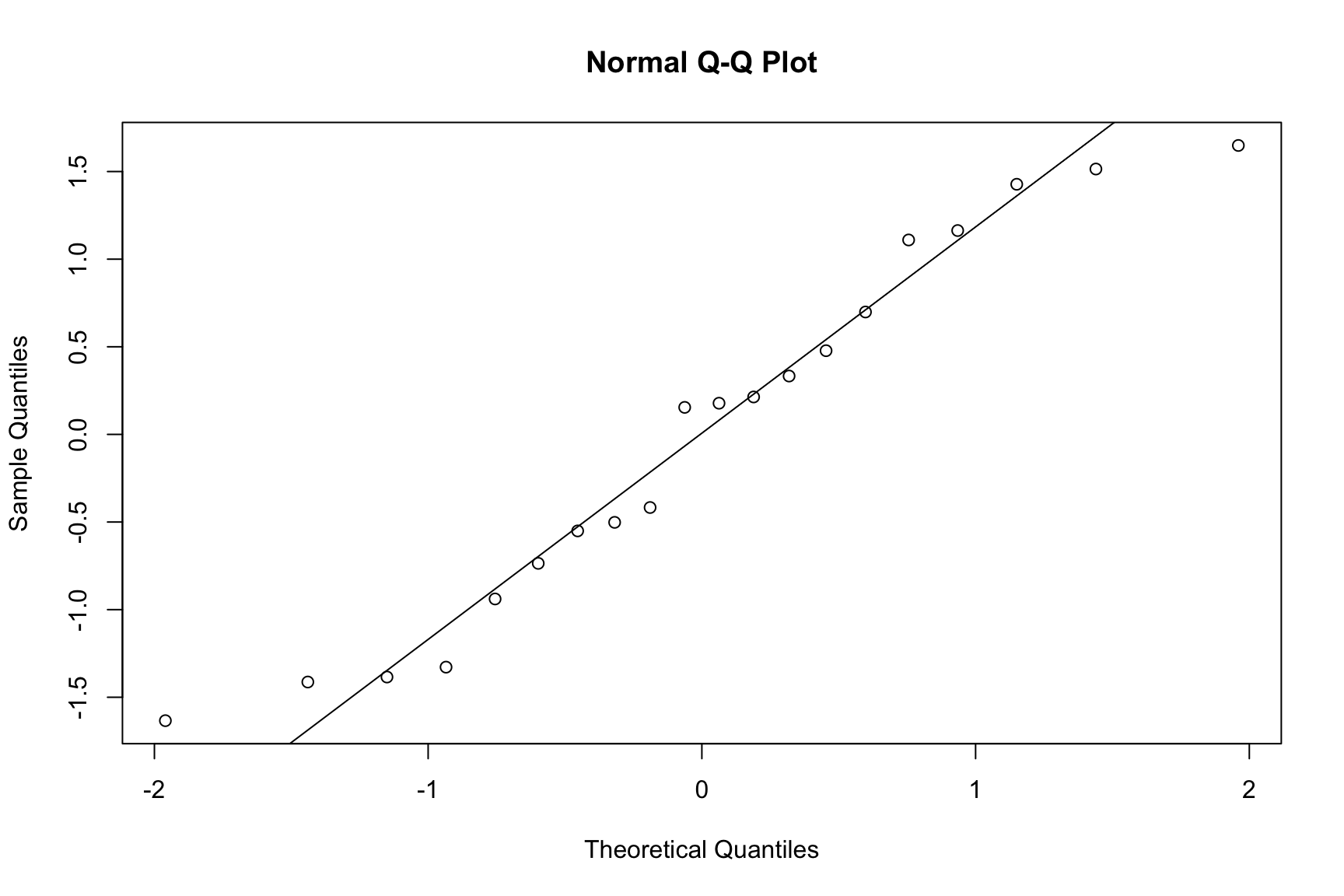
A Normal Q-Q plot is used to check if the residuals are normally distributed. The points should fall closely along the straight diagonal line.

Code
qqnorm(r)
qqline(r)

Normal Q-Q plot of standardized residuals.
7.1.2.6.2 Independence of Residuals

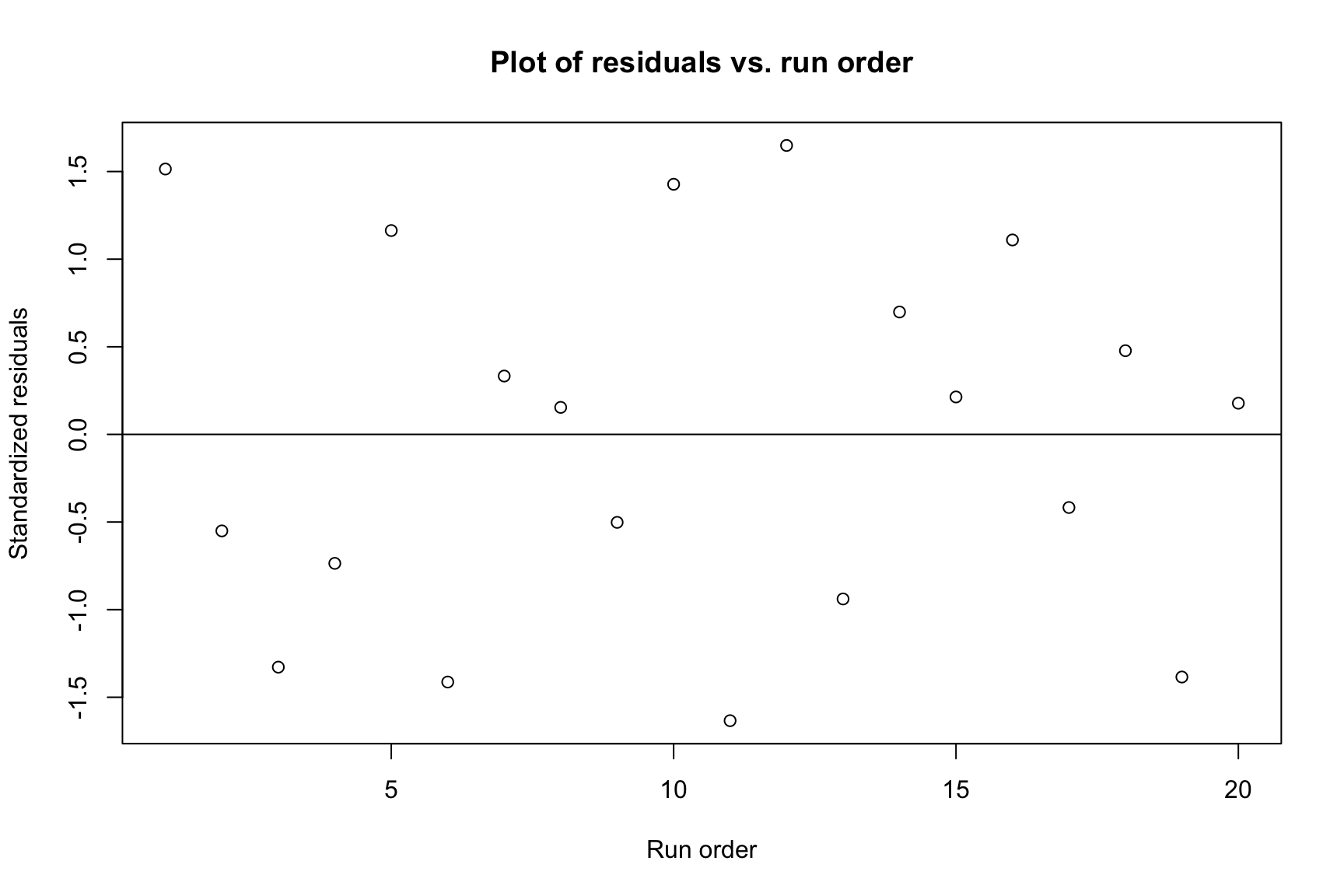
A plot of residuals versus run order helps check for independence. We look for random scatter around the zero line.

Code
plot(r, ylab = "Standardized residuals", xlab = "Run order",
     main = "Plot of residuals vs. run order")
abline(h = 0)

Standardized residuals vs. run order.
7.1.2.6.3 Constant Variance (Homoscedasticity)

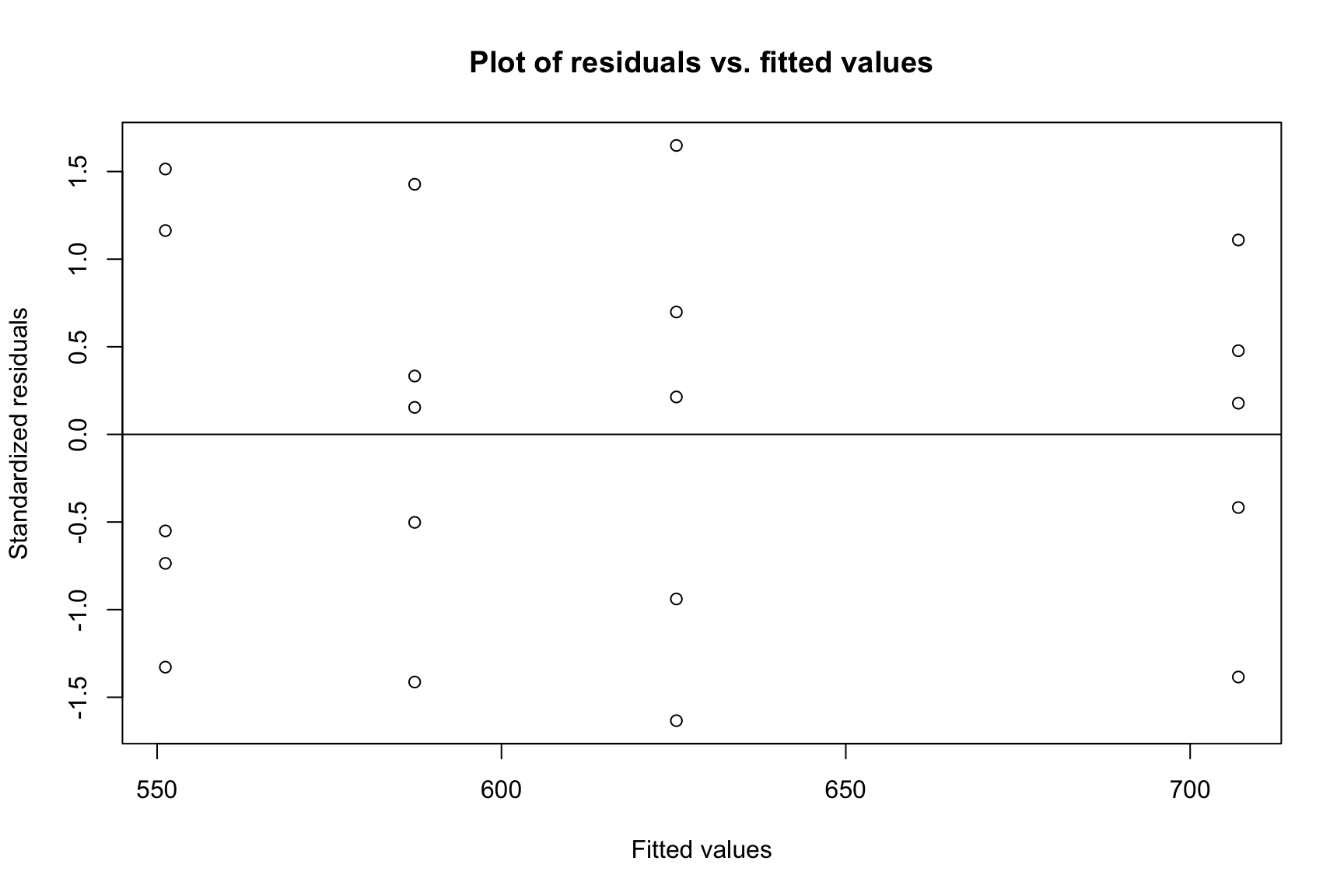
A plot of residuals versus fitted values helps check for constant variance. The spread of residuals should be roughly constant across all fitted values.

Code
plot(fitted, r, ylab = "Standardized residuals", 
     xlab = "Fitted values", main = "Plot of residuals vs. fitted values")
abline(h = 0)

Standardized residuals vs. fitted values.

7.2 Unbalanced Designs with Unequal Sample Sizes

The ANOVA framework also handles unbalanced designs. We again start by creating a data frame.

Code
## Create the data frame
bricks_df <- data.frame(
  density = c(21.8, 21.9, 21.7, 21.6, 21.7,
              21.7, 21.4, 21.5, 21.4,
              21.9, 21.8, 21.8, 21.6, 21.5,
              21.9, 21.7, 21.8, 21.4),
  temperature = factor(c(rep(100, 5), rep(125, 4), rep(150, 5), rep(175, 4)))
)

bricks_df
Code
## Fit the model and get the ANOVA table
fit2 <- lm(density ~ temperature, data = bricks_df)
summary(fit2)

Call:
lm(formula = density ~ temperature, data = bricks_df)

Residuals:
   Min     1Q Median     3Q    Max 
-0.300 -0.100  0.000  0.095  0.200 

Coefficients:
               Estimate Std. Error t value Pr(>|t|)    
(Intercept)    21.74000    0.07171 303.150   <2e-16 ***
temperature125 -0.24000    0.10757  -2.231   0.0425 *  
temperature150 -0.02000    0.10142  -0.197   0.8465    
temperature175 -0.04000    0.10757  -0.372   0.7156    
---
Signif. codes:  0 '***' 0.001 '**' 0.01 '*' 0.05 '.' 0.1 ' ' 1

Residual standard error: 0.1604 on 14 degrees of freedom
Multiple R-squared:  0.3025,    Adjusted R-squared:  0.153 
F-statistic: 2.024 on 3 and 14 DF,  p-value: 0.1569
Code
anova(fit2)

In this case, the large p-value (0.133) indicates that there is no statistically significant evidence that firing temperature affects brick density.

7.3 Randomized Complete Block Design

7.3.1 Vascular Graft Experiment

This section analyzes a Randomized Complete Block Design (RCBD), used to control for a known source of variability (here, “batches of resin,” treated as blocks).

7.3.1.1 Data and Visulization

We structure the data in a data.frame to identify the response, treatment (pressure), and block (batch) for each observation.

Code
## Define data vectors
strength <- c(90.3, 89.2, 98.2, 93.9, 87.4, 97.9,
              92.5, 89.5, 90.6, 94.7, 87.0, 95.8,
              85.5, 90.8, 89.6, 86.2, 88.0, 93.4,
              82.5, 89.5, 85.6, 87.4, 78.9, 90.7)
pressure_levels <- rep(c(8500, 8700, 8900, 9100), each = 6)
batch_levels <- rep(1:6, 4)

## Create the data frame
graft_df <- data.frame(
  strength = strength,
  pressure = factor(pressure_levels),
  batch = factor(batch_levels)
)


graft_df

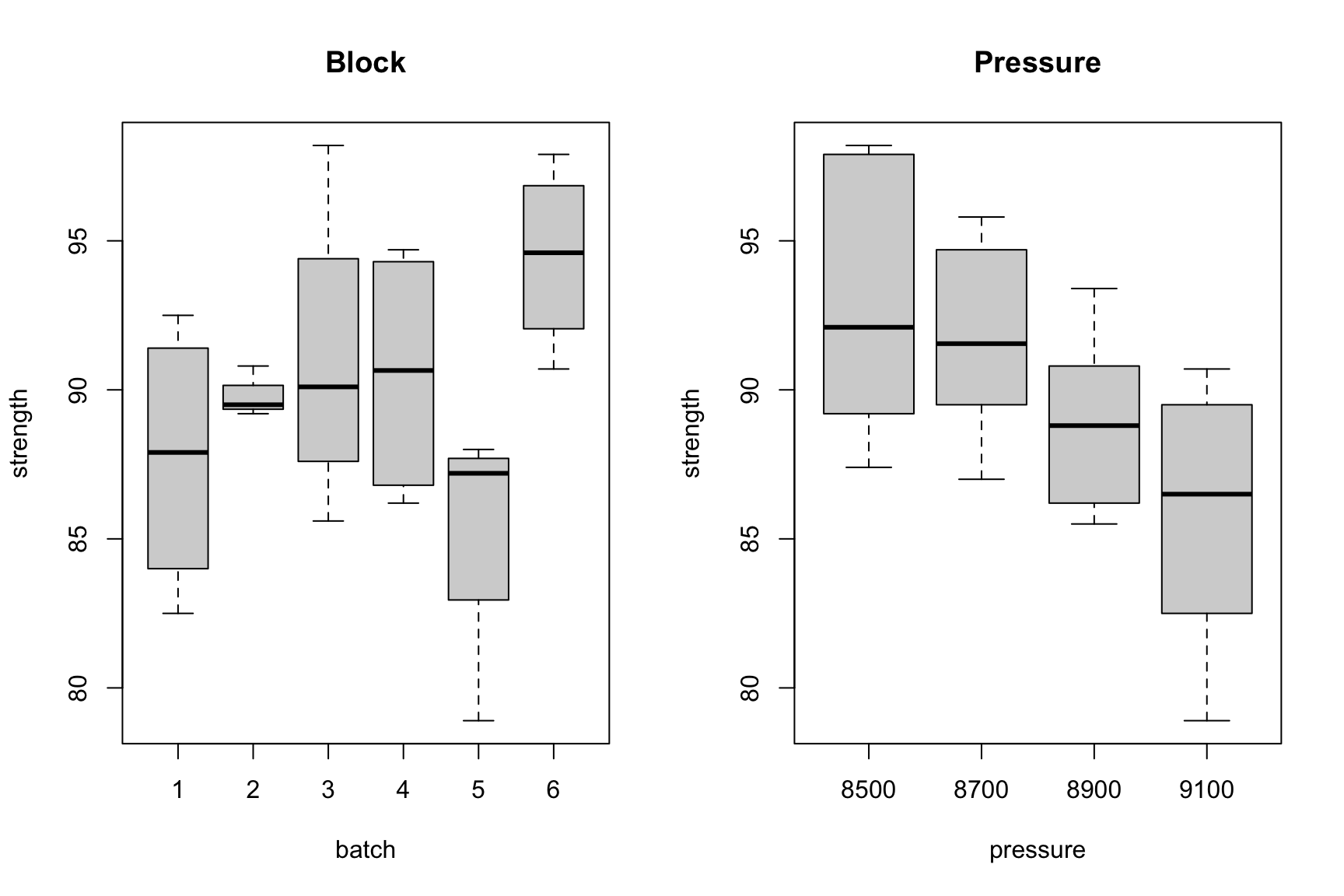
Visualize the Block and Treatment Effects

Code
par (mfrow = c(1,2))
#boxplot
plot(strength ~ batch, data=graft_df , main = "Block")
plot(strength ~ pressure, data=graft_df , main = "Pressure")

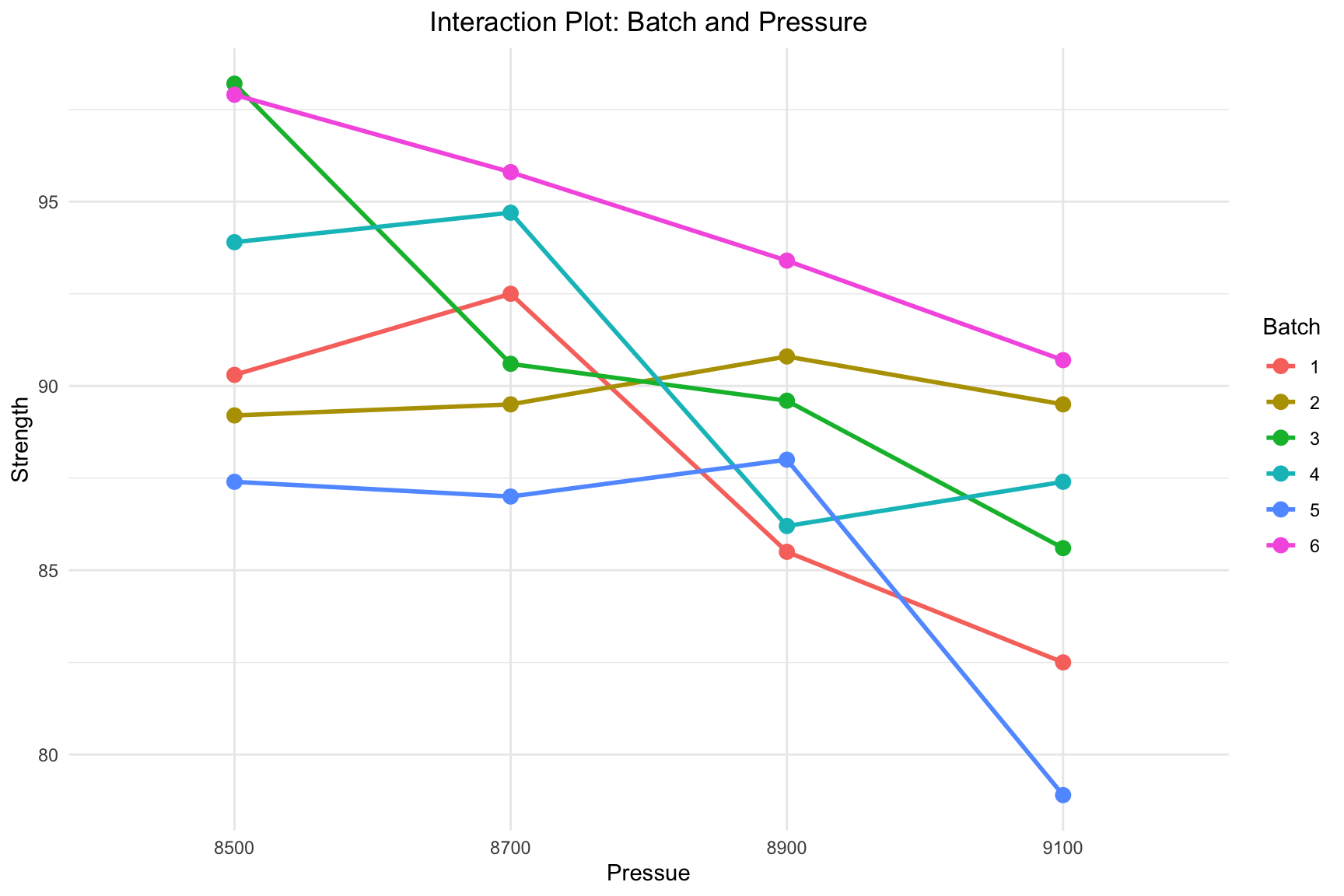
Interaction Plots

Code
ggplot(graft_df, aes(x = pressure, y = strength, group = batch, color = batch)) +
  stat_summary(fun = mean, geom = "line", size = 1) +
  stat_summary(fun = mean, geom = "point", size = 3) +
  labs(
    title = "Interaction Plot: Batch and Pressure",
    x = "Pressue",
    y = "Strength",
    color = "Batch"
  ) +
  theme_minimal() +
  theme(plot.title = element_text(hjust = 0.5))

Interaction between Material Type and Temperature.

7.3.1.2 Model Fitting and ANOVA

The model strength ~ pressure + batch partitions the total variance into treatment, block, and error components. Our primary interest is in the significance of the pressure factor.

Code
rcbd.fit1 <- lm(strength ~ pressure + batch, data = graft_df)
summary(rcbd.fit1)

Call:
lm(formula = strength ~ pressure + batch, data = graft_df)

Residuals:
    Min      1Q  Median      3Q     Max 
-3.5708 -1.3333 -0.3167  1.1417  4.1792 

Coefficients:
             Estimate Std. Error t value Pr(>|t|)    
(Intercept)    90.721      1.657  54.735  < 2e-16 ***
pressure8700   -1.133      1.563  -0.725 0.479457    
pressure8900   -3.900      1.563  -2.496 0.024713 *  
pressure9100   -7.050      1.563  -4.512 0.000414 ***
batch2          2.050      1.914   1.071 0.301043    
batch3          3.300      1.914   1.724 0.105201    
batch4          2.850      1.914   1.489 0.157175    
batch5         -2.375      1.914  -1.241 0.233684    
batch6          6.750      1.914   3.527 0.003050 ** 
---
Signif. codes:  0 '***' 0.001 '**' 0.01 '*' 0.05 '.' 0.1 ' ' 1

Residual standard error: 2.707 on 15 degrees of freedom
Multiple R-squared:  0.7712,    Adjusted R-squared:  0.6492 
F-statistic: 6.321 on 8 and 15 DF,  p-value: 0.00113
Code
anova(rcbd.fit1)

The small p-value for pressure (0.0019) provides strong evidence that extrusion pressure significantly affects graft strength after accounting for batch differences.

7.3.1.3 Visualizing the Additive Assumption

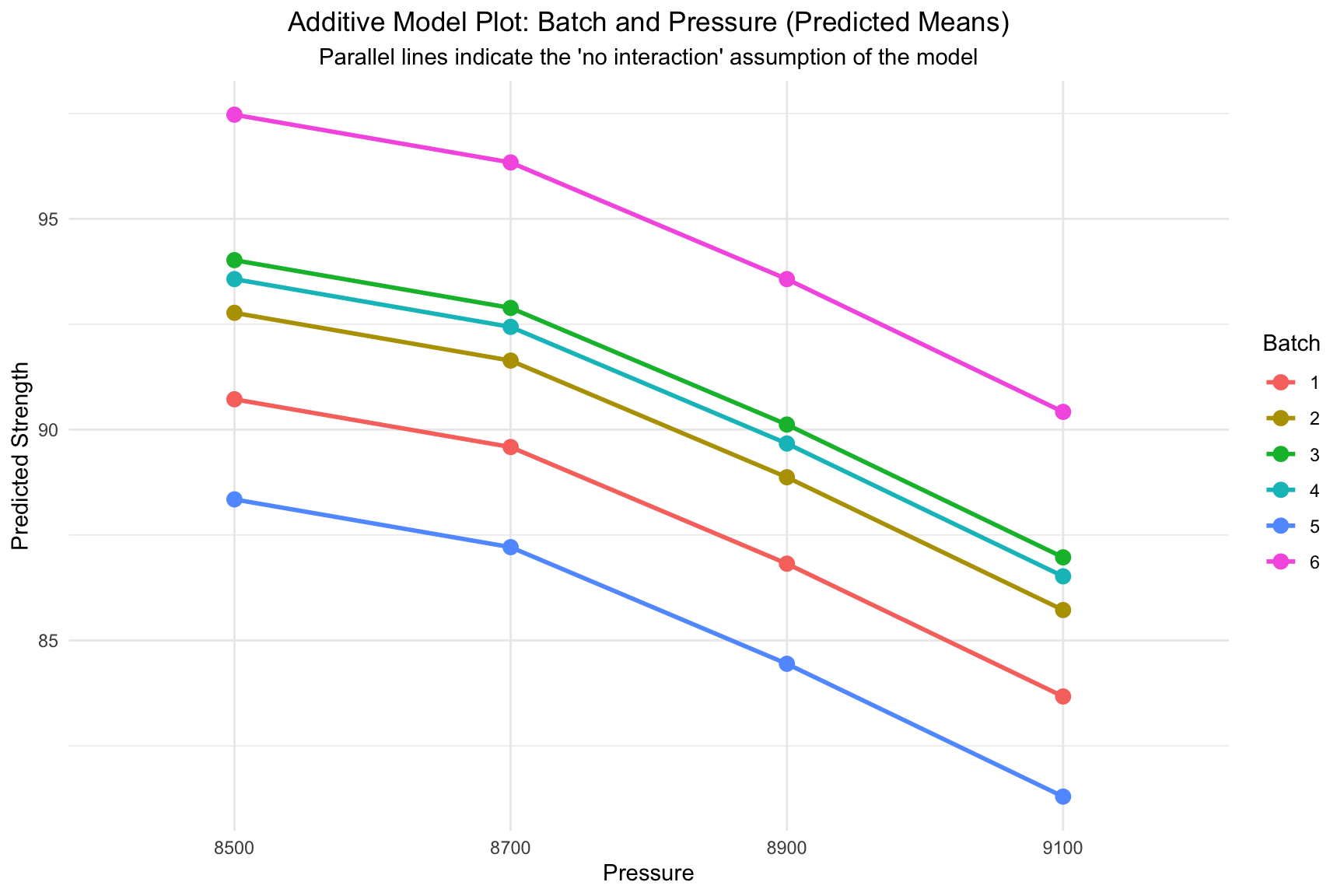
The plot below visualizes the predictions generated by the fitted additive model (strength ~ pressure + batch). Notice that the lines are perfectly parallel, which is the graphical representation of the model’s assumption that there is no interaction between the two factors.

Code
# 1. Create a data frame for plotting predictions
pred_df <- graft_df

# 2. Make predictions using the fitted additive model
pred_df$predicted_strength <- predict(rcbd.fit1, newdata = pred_df)

# 3. Plot the predicted values
#    Plotting the predicted means will show the parallel lines.
ggplot(pred_df, aes(x = pressure, y = predicted_strength, group = batch, color = batch)) +
  # Use stat_summary to plot the predicted means for each pressure/batch combination
  stat_summary(fun = mean, geom = "line", size = 1) +
  stat_summary(fun = mean, geom = "point", size = 3) +
  labs(
    title = "Additive Model Plot: Batch and Pressure (Predicted Means)",
    subtitle = "Parallel lines indicate the 'no interaction' assumption of the model",
    x = "Pressure",
    y = "Predicted Strength",
    color = "Batch"
  ) +
  theme_minimal() +
  theme(plot.title = element_text(hjust = 0.5),
        plot.subtitle = element_text(hjust = 0.5))

Interaction plot showing the predictions from the additive model (parallel lines).

7.3.1.4 Model Adequacy Checks

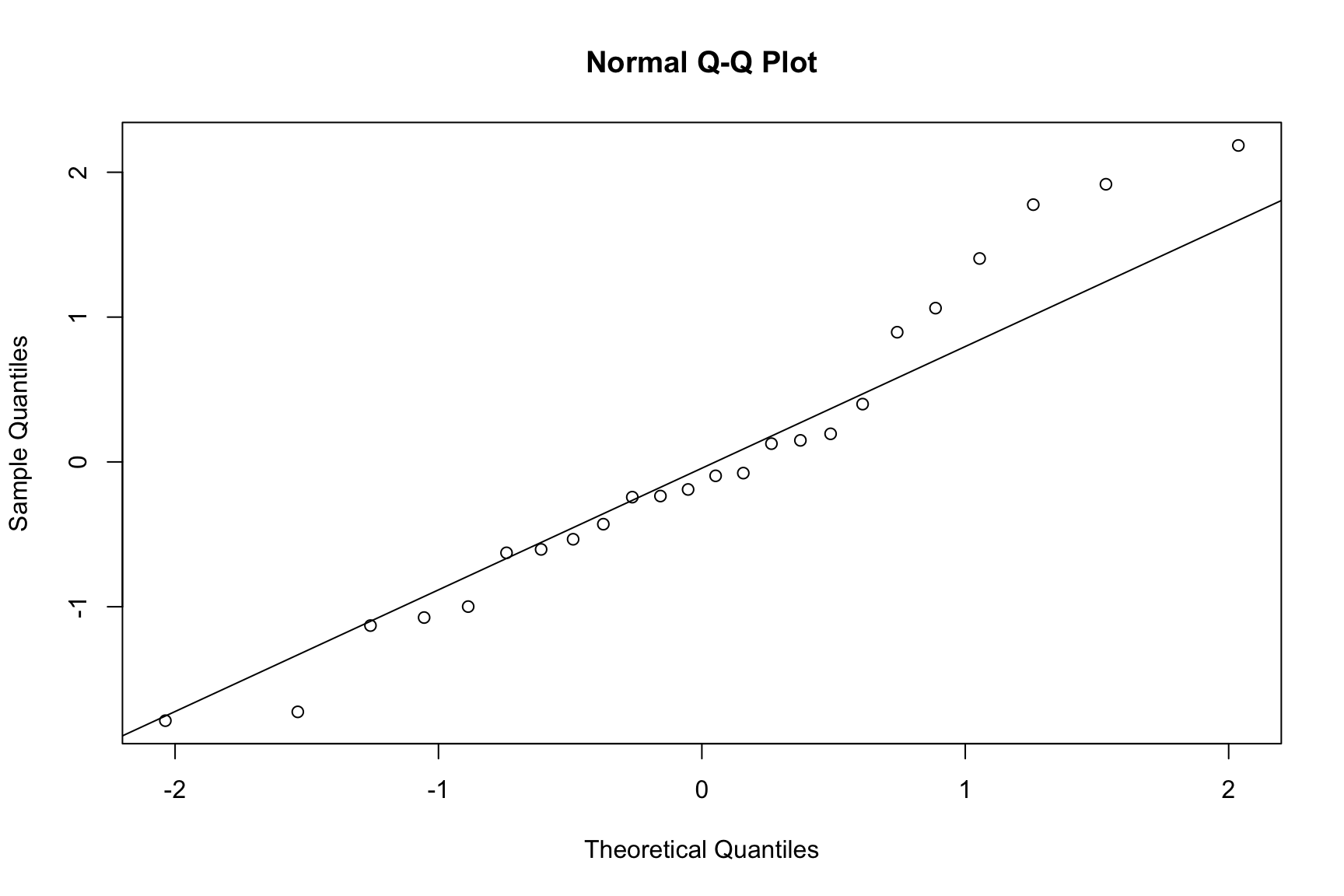
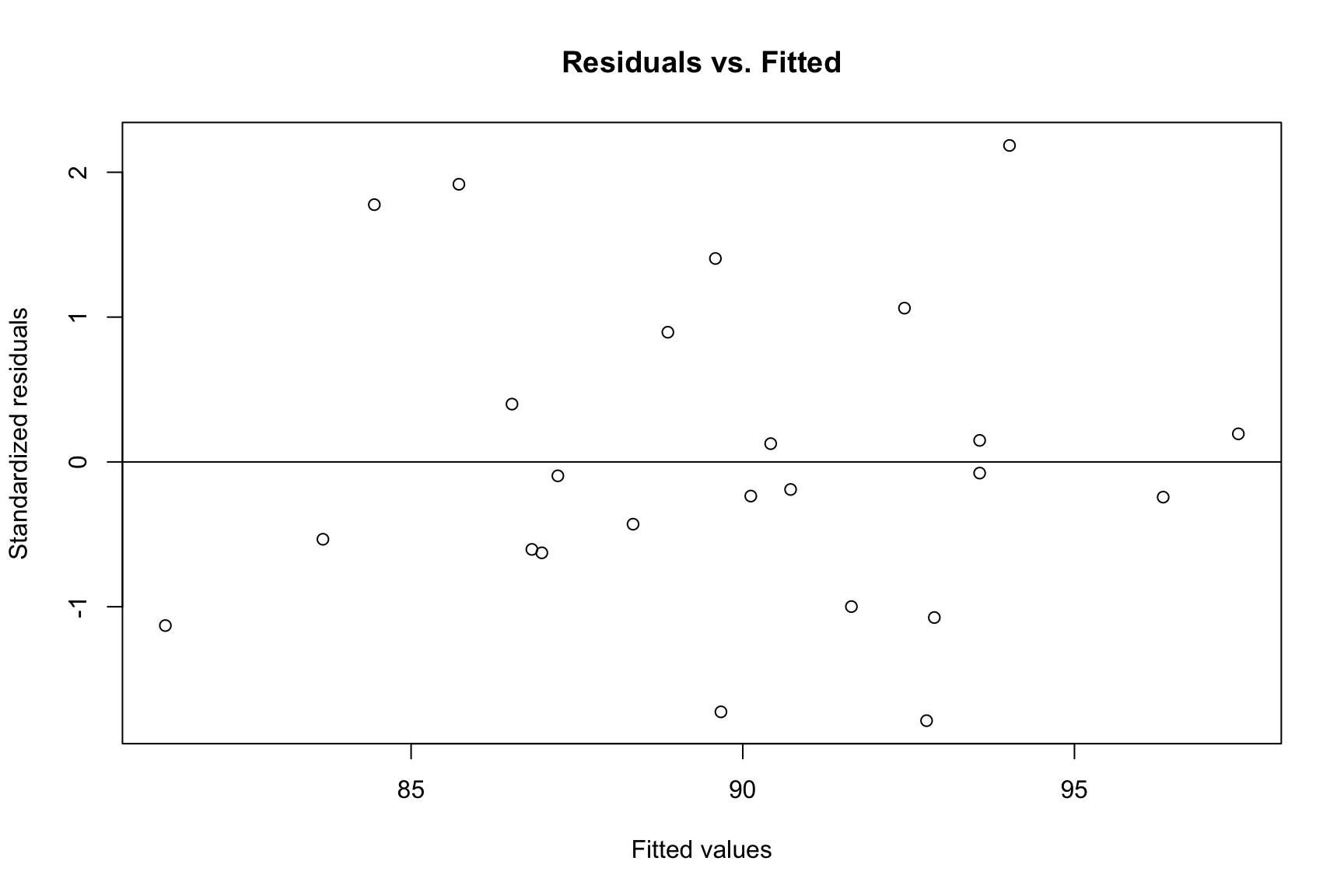
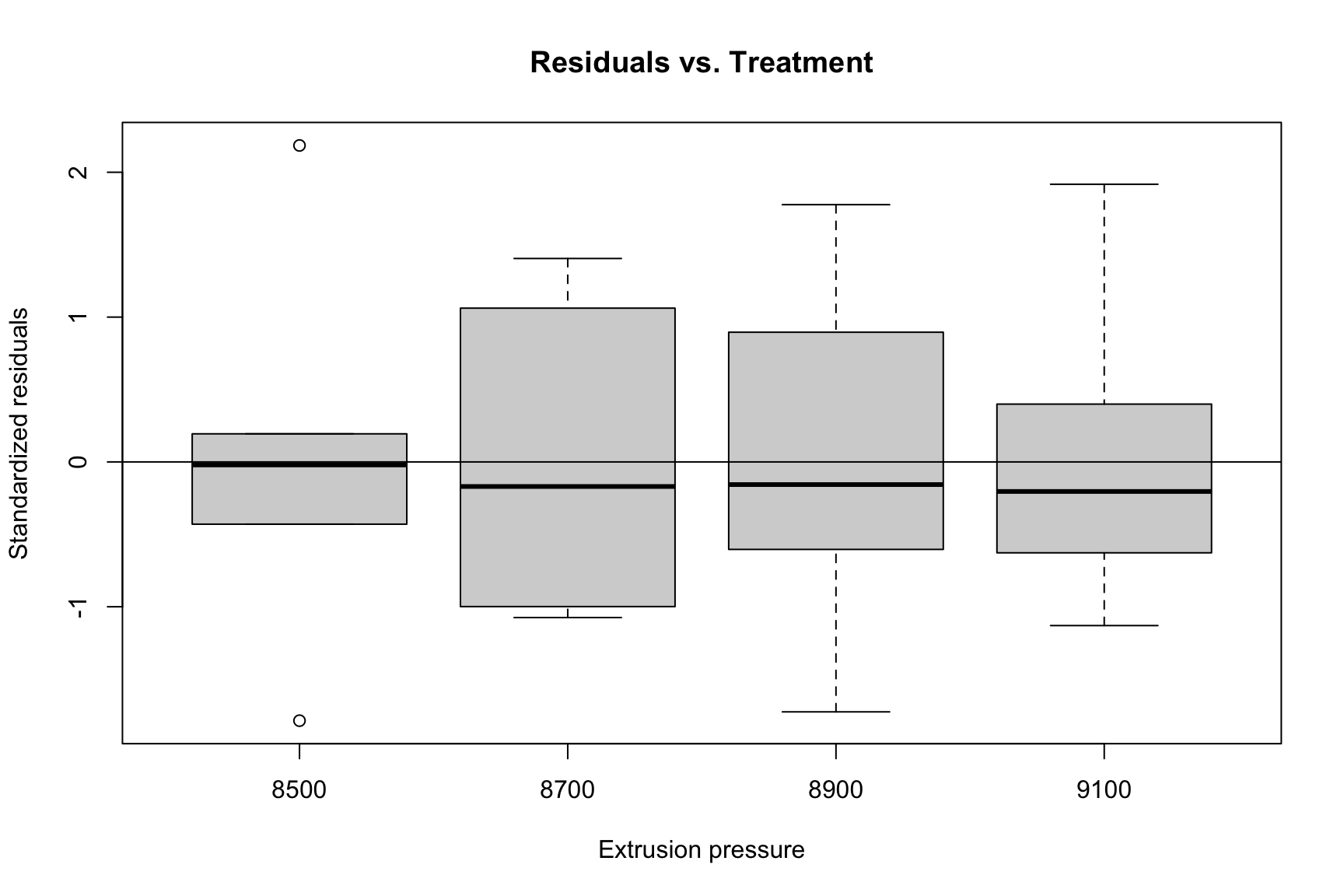
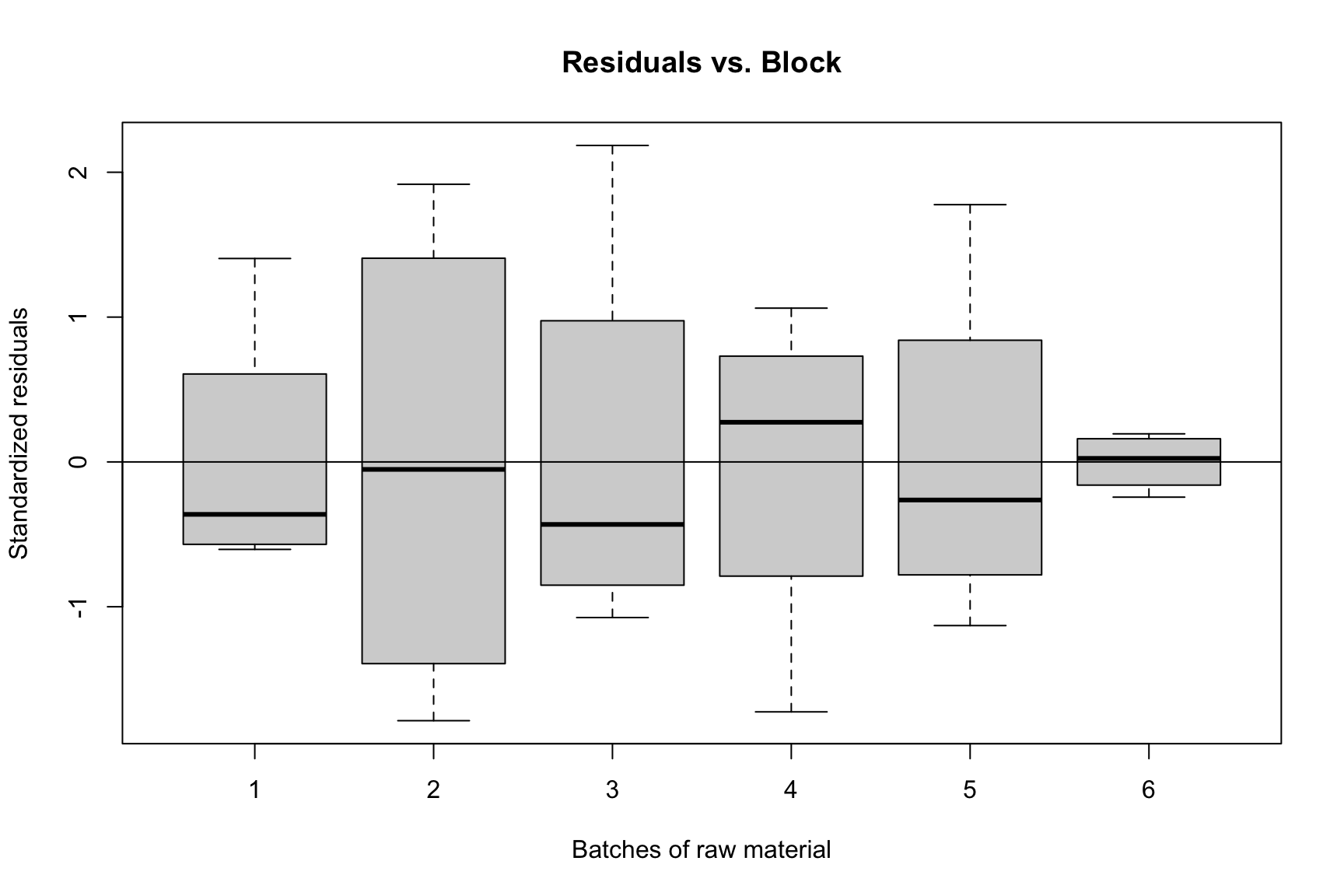
The assumptions for an RCBD are the same as for a CRD. We perform the same diagnostic checks.

Code
rcbd.r1 <- rstudent(rcbd.fit1)
rcbd.fitted1 <- fitted.values(rcbd.fit1)

qqnorm(rcbd.r1, main = "Normal Q-Q Plot")
qqline(rcbd.r1)
plot(rcbd.fitted1, rcbd.r1, ylab = "Standardized residuals", 
     xlab = "Fitted values", main = "Residuals vs. Fitted")
abline(h = 0)
plot(graft_df$pressure, rcbd.r1, ylab = "Standardized residuals", 
     xlab = "Extrusion pressure", main = "Residuals vs. Treatment")
abline(h = 0)
plot(graft_df$batch, rcbd.r1, ylab = "Standardized residuals", 
     xlab = "Batches of raw material", main = "Residuals vs. Block")
abline(h = 0)

Normal Q-Q Plot

Residuals vs. Fitted Values

Residuals vs. Treatment (Pressure)

Residuals vs. Block (Batch)

7.3.1.5 Pairwise Comparisons

Again, since the treatment factor (pressure) is significant, we perform post-hoc tests.

7.3.1.5.1 Tukey’s HSD Test

Tukey’s HSD compares all pairs of treatment levels while controlling the family-wise error rate.

Code
rcbd.aov <- aov(strength ~ pressure + batch, data = graft_df)

TukeyHSD(rcbd.aov, which = "pressure")
  Tukey multiple comparisons of means
    95% family-wise confidence level

Fit: aov(formula = strength ~ pressure + batch, data = graft_df)

$pressure
               diff        lwr       upr     p adj
8700-8500 -1.133333  -5.637161  3.370495 0.8854831
8900-8500 -3.900000  -8.403828  0.603828 0.1013084
9100-8500 -7.050000 -11.553828 -2.546172 0.0020883
8900-8700 -2.766667  -7.270495  1.737161 0.3245644
9100-8700 -5.916667 -10.420495 -1.412839 0.0086667
9100-8900 -3.150000  -7.653828  1.353828 0.2257674
7.3.1.5.2 Fisher’s LSD Test

The LSD.test() function from the agricolae package correctly handles the error structure of an RCBD.

Code
## install.packages("agricolae")
library(agricolae)

out <- LSD.test(rcbd.fit1, trt = "pressure", p.adj = "none", group = FALSE)
print(out$comparison)
            difference pvalue signif.        LCL       UCL
8500 - 8700   1.133333 0.4795         -2.1974047  4.464071
8500 - 8900   3.900000 0.0247       *  0.5692620  7.230738
8500 - 9100   7.050000 0.0004     ***  3.7192620 10.380738
8700 - 8900   2.766667 0.0970       . -0.5640714  6.097405
8700 - 9100   5.916667 0.0018      **  2.5859286  9.247405
8900 - 9100   3.150000 0.0621       . -0.1807380  6.480738